
Get Paid Without Chasing Clients
Put Your Invoice & Payment Follow-Up on Autopilot
Sending an invoice shouldn't create another list of things your team has to remember.
Your CRM can help you send payment requests, track payment status, remind clients when payment needs attention, notify your team when money comes in, and trigger the next step automatically.
Watch the quick lesson below to see how it works.

Learn how to use invoices and payments inside your CRM—and discover ways to automate what happens before and after a client pays.
who we serve
Real support for real business owners, who are done doing it all themself
We work with small service-based businesses that rely on leads, conversations, and follow-ups — but feel overwhelmed by systems, manual work, and too many tools that don’t talk to each other.
If everything still lives in your head (or WhatsApp, notes, and spreadsheets), you’re in the right place.

Service-Based Businesses
You work with clients one-on-one or in small teams and missed follow-ups, forgotten appointments, or messy communication.

Growing Teams
You’re growing, but don’t want to add chaos or hire more people just to stay organized.

Consultants & Professionals
You have great conversations — but need a system that turns them into clients, follow-ups, and repeat business automatically.

Entrepreneurs Scaling Up
You want to grow with clarity and control — not burnout, chaos, or dependency on memory.
What changes when your system finally works the way you do
This isn’t about trends or theory.
It’s what consistently happens when small service business owners stop forcing themselves into generic tools — and get a system built around their real workflow.
You stop keeping everything in your head
Follow-ups and reminders happen automatically
You recover time, leads, and peace of mind
When your CRM fits how you actually work — instead of forcing you to adapt — everything starts to feel lighter and more controlled.
Sending the Invoice Is Only Step One
Think about what happens in your business after an invoice goes out.
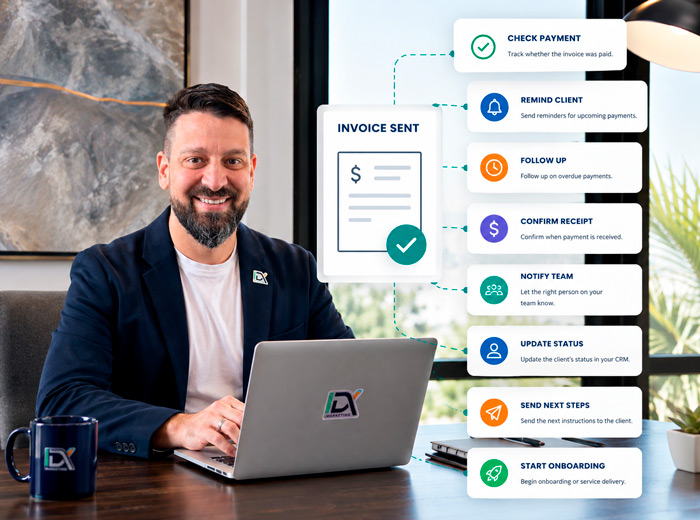
Someone may need to:
Check whether it was paid.
Remind the client about an upcoming payment.
Follow up when a payment becomes overdue.
Confirm that payment was received.
Notify someone on your team.
Update the client's status.
Send the next instructions.
Start onboarding or service delivery.
Individually, these may seem like small tasks.
But when they happen repeatedly across multiple clients, they consume time and create opportunities for things to get missed.
That's where automation becomes useful.
A payment event can become the trigger for what happens next.
What Could Your CRM Do?
Here are a few ideas to consider for your business.

Remind Clients Before a Payment Is Due
You don't necessarily need to wait until a payment is late.
Your system can help remind clients before action is required.
Payment approaching → Send friendly reminder → Provide payment instructions
A simple reminder can make the payment process easier for both sides.

Follow Up on Overdue Payments
Instead of checking invoices manually and writing another message:
Payment overdue → Wait → Send reminder
If the payment still hasn't been completed, the process can escalate:
Still unpaid → Create task → Notify team member
Automation handles the routine reminder.
Your team gets involved when human attention is actually needed.

Automatically Confirm Payment
Payment received?
Don't leave the client wondering whether everything went through.
Payment received → Send confirmation → Thank client
It's a small detail that can create a more professional experience.

Notify Your Team When Someone Pays
Someone on your team may need to know immediately when a payment is completed.
Instead of checking the payment system:
Payment received → Internal notification
The right person knows it's time to move forward.

Move the Client to the Next Stage
Payment often means something important has changed.
A prospect may now be a client.
A deposit may mean work can begin.
A completed balance may mean a project can close.
Your CRM can use that event to help update your process.
Payment received → Update status or pipeline → Notify team → Start next step
Now your payment system and client process work together.

Start Onboarding After Payment
This is where payment automation becomes particularly useful.
Imagine:
Contract signed → Invoice sent → Payment received → Welcome email → Intake form → Internal task → Onboarding begins
Instead of several disconnected actions, you're creating one continuous client journey.
Think About Your Own Business
What happens when someone needs to pay you?
Do you collect:
Service payments?
Appointment fees?
Recurring payments?
Project balances?
Membership fees?
Final payments?
Now ask:
What does your team manually do before and after each of those payments?
That's where the automation opportunities usually are.
Don't Automate the Relationship
Automation doesn't mean sending endless payment reminders until someone pays.
The objective is to automate the predictable administrative work while keeping your team involved when a situation requires judgment or a personal conversation.
For example:
Routine reminder → CRM
Payment confirmation → CRM
Internal notification → CRM
Unusual payment issue → Human
That's a much healthier use of automation.

Start Simple
You don't need a complicated billing system.
Start with one question:
What is one payment-related task we repeatedly do manually?
Maybe it's checking unpaid invoices.
Maybe it's sending reminders.
Maybe it's notifying the team.
Maybe it's starting onboarding after payment.
Automate that first.
Then improve the process over time.
Want to Improve Your Payment Process?

IDX can help you connect invoices, payments, reminders, notifications, pipelines, and follow-up into a cleaner process inside your CRM.
You don't need to figure out the automation yourself.
Tell us what you're currently doing manually.
We'll help you determine what your CRM could handle instead.
Or simply reply to the email or text you received from us and tell us what you're trying to accomplish.

Your CRM Shouldn't Just Send the Invoice. It Should Help Manage What Happens Next.
Relax, we automate.
This module also connects very naturally to your existing Payment Workflow Setup offer: invoice/payment setup, payment-status tracking, confirmations, upcoming and overdue reminders, and internal notifications. That means the educational content leads directly into a service you already have clearly scoped, rather than inventing a new upsell just for the campaign.


GetIDX is operated by Intelligent Digital eXperience, formerly Imagine Digital eXpressions and previously known online as IDX.Marketing. We now specialize in CRM systems, lead follow-up, and automation support for growing businesses.
QUICK LINKS
CRM & RESOURCES
CONTACT US
8865 Commodity Circle Ste 14-101
Orlando – FL 32819
(321) 321-9222


© 2026 IDX. All Rights Reserved. Privacy Policy. Terms of Service. LLMs
© 2026 IDX. All Rights Reserved.